The Right Way to Add RTL Support
A step-by-step guide to add RTL support to your site.
Thank you having RTL support in mind; It's very much appreciated.
Without RTL support, sites are not useable for RTL users. Some other times, RTL support is implemented poorly and results in usability and UI/UX issues.
Use dir="rtl" attribute
Using dir="rtl" attribute tells the broser the site content langauge is written from right to left. When the site language is set to a LTR langauge, make sure to change it to dir="ltr", or remove it.
As a result of using dir="rtl" attribute on the html tag, browsers will get many RTL things doen and working for you by default and out of the box. Note that the browsers won't know what to do with the CSS/JS styles of a site.
Make sure to use the HTML dir attribute as much as possible instead of using the CSS direction property.
CSS Logical Properties
Your LTR CSS styles doesn't get automatically mirrored for RTL langauges. A property like margin-left functions as left margin no matter the writing direction. In order to mirror styles and not have naming issues, something called CSS Logical Properties was introduced to CSS.
In short, instead of writing this CSS code:
.container {
    margin-left: auto;
    margin-right: auto;
}
You should write:
.container {
    margin-inline-start: auto;
    margin-inline-end: auto;
}
Or the shorthand:
.container {
    margin-inline: auto;
}
And this would function properly for both LTR and RTL languages.
CSS Properties that doesn't have logical support
caption-sideCSS propertyclearCSS propertyresizeCSS propertybackground-positionCSS propertytransform-originCSS propertytranslateX()CSS functionrotate()CSS function
What to do when there is no CSS Logical Properties support?
I had this code:
.element {
    transform-origin: top left;
}
And I wanted to make it work for RTL languages. Something like this won't work:
.element {
    transform-origin: right start;
}
The solution is to use CSS variables.
transform-origin example:
:root {
    --inline-start: left;
}
[dir="rtl"] {
    --inline-start: right;
}
.element {
    transform-origin: top var(--inline-start);
}
The result would be top left for LTR languages and top right for RTL languages.
rotate() example:
:root {
    --rtl: 1;
}
[dir="rtl"] {
    --rtl: -1;
}
.element {
    transform: rotate(calc(90deg * var(--rtl)));
}
The result would be 90deg for LTR languages and -90deg for RTL languages.
translate() example:
:root {
    --rtl: 1;
}
[dir="rtl"] {
    --rtl: -1;
}
.element {
    position: absolute;
    inset-inline-start: 50%;
    transform: translateX(calc(-50% * var(--rtl)));
}
The result would be -50% for LTR languages and 50% for RTL languages.
--inline-start or --start
At first you may think that the inline and block prefixes ([inline | block]-[start - end]) are only used when properties have all four sides (top right bottom left). But this doesn't seem to be true:
Some properties use start and end (like text-align) and some other use inline-start and inline-end (like float). So, there doesn't seem to be any naming consistency being followed.
Some properties (like text-align) only have left and right sides, and some other properties (like vertical-align) only have top and bottom properties. So, if we were to just use --[start | end], would it be for left and right or top and bottom?
So, using --start and --end won't work. Let's just use --{inline,block}-{start-end}. This would make it super clear what side we are targetting and remove any confusion and issues.
CSS properties that need RTL support
The list may not be complete.
text-alignfloatmargin1margin-leftmargin-rightpadding1padding-leftpadding-rightborder-leftborder-rightborder-top-left-radiusborder-top-right-radiusborder-bottom-left-radiusborder-bottom-right-radiusborder-right-colorborder-right-styleborder-right-widthleftrightinset1inset-leftinset-rightbackground-positionbackground-position-x
Always make sure to use as little as possible code
I've seen it a lot that styling like text-align: left is all over the place is some sites and libraries. This is a bad practise even outside of subject of this article. For example, if your site is in LTR, you don't need to add CSS text-align: left to any or every element, unless it's necessary for some reason.
You are not done yet!
Adding direction support isn't easy and it's honestly an unsolved problem. There would never be 100% support for two directions at the same time.
Let's continue with the next step.
In RTL, some things should still stay LTR and left-aligned
For example, an input tag that takes URL as input should still be LTR and left-aligned. Because the content inside the input is in a LTR language. Even when it contains RTL characters, the first characters like https:// are still LTR. So, URL inputs should always be LTR.
Fields that are always in LTR languages, should always stay LTR, like urls, passwords, slugs, paths, file names and UUIDs, code fields, number fields, etc.
What if in input can contain both LTR only and RTL only characters? For example for a slug field, you can use dir="auto" attribute to let the browser decide the direction. Learn more about dir attribute here.
You can copy-paste a text inside an input with dir="auto" attribute, and you can figure out the direction a text should be in. If you pasted a RTL text, the input will be RTL. If you pasted a LTR text, the input will be LTR. If it starts with something like / but continues with RTL characters, it will be RTL. This is because the first character isn't really direction spasific I guess.
As far as I know, numbers should always be LTR. For example in Farsi/Persian langauge, numbers are written from left to right. So, they should always be shown from left to right.
It's not just about inputs, you may have content that should be LTR and left-aligned. For example, code blocks, text that shows a path like /home, and so on. Something like /home may look like home/ in RTL direction, which is incorrect, because it looks like a different value visually. So, it should always be LTR.
When RTL text in the placeholder of a number input is shown from LTR
Example:
<html lang="fa" dir="rtl">
    <input type="number" dir="ltr" placeholder="شماره موبایل" />
</html>
The input has dir="ltr" because as it's explained above, somethings should always stay LTR.
The placeholder text will be shown from LTR, and this is not good because the text is RTL. So, the input content should be LTR but the placeholder should be RTL. Solution:
input[type="number"]:placeholder-shown {
    direction: inherit;
}
This means select input tag that is type of number when the placeholder is shown, if so, set direction of the input to inherit from the parent, which is rtl.
You may want to adjust styling to this, because maybe for some inputs, their parent isn't going to be rtl, if so it would be problamatic.
html[dir="rtl"] input[type="number"]:placeholder-shown {
    direction: rtl;
}
Note that you should add this placeholder related code to every input that is LTR, so it isn't only for number inputs.
Learn more:
Icon direction
NOTE
note that we are using emojies and emojies can look different based on device OS.
Icons can be mirrored, or in another word, (horizontally) flipped; So they can match the reading and looking direction of the users and provide a better visual and experiense for them.
Shouldn't be mirrored: When the meaning or the shape breaks. Example:
- ✅ : ✅
- 🕒 : 🕒
Shouldn't be mirrored: When it's a brand logo, flag or similar. Example:
- 🐦 : 🐦 Logo
- ☯️ : ☯️ Symbol
- 🔰 : 🔰 Flag
Shouldn't be mirrored: When a text is displayed. Example:
- 💲 : 💲
- 💯 : 💯
- 🔝 : 🔝
- 🤬 : 🤬
Shouldn't be mirrored: When one part of a shape should be mirrored but another part shouldn't. Example:
- 🔚 : 🔚
The example above contains text, but sometimes it may be two shapes (with no text) that one should and another shouldn't be mirrored.
The solution is to duplicate the icon and modify it; Mirror what needs to be mirrored; Now you would have an RTL version of that icon that can be used in RTL contexts.
- 🔚 : 🔚
Doesn't need to be mirrored: When they are symmetrical. Examples:
- 😊 : 😊
- ♥️ : ♥️
- 🛑 : 🛑
- ☢️ : ☢️
Could easily be mirrored: When it wouldn't break the meaning or the shap. Example:
- 📞 : 📞
- 🚀 : 🚀
- 🔊 : 🔊
- 🏳️ : 🏳️
- ➡️ : ➡️
- 👈 : 👈
Not sure about these:
- ♻️ : ♻️
It may be better to manually review all icons, exclude what doesn't make sense and mirror what makes sense. This would mean reviewed ones gonna work as expected but in feature new icons should be reviewed to which may be missed. What if we just mirrored them all? This could work, but not really. If you flip a wrong icon, it's a worse issue than if you don't flip it at all.
OS window traffic light actions
Is it a good idea to mirror traffic lights 🚥 : 🚥 in MacOC app window acctions? No, it's a bad idea! The same with Windows. It would cause UX issues; The OS may be in English (LTR) but your app could be set to an RTL lanauge, in this scenario all apps other than yours would have LTR traffic light acctions, and user would get annoyed and frasturated that it's only your app that behaves this way and breaks their muscle memory. So, they should be untouched, you should specifically check to make sure they bot on LTR and RTL they look the same and are in the same place and position as eachother.
Note that this may not make sense, and you are right to think that way because it doens't. If the traffic light actions look like 🚥 in LTR, it makes sense for them to look like 🚥 in RTL. But as explained, the actions in the rest of the apps and windows (➖🟪✖️ being placed on the right side) are going to look like how they are in LTR.
Same thing applied to scrollbars too. For LTR sites the scrollbar is on the right side, but for RTL it should be on the left side, so that it's not on the way and you looking at it all the time. The same rules that effects everything, should apply here too. But it's the same as window traffic light actions. In RTL sites with <html lang="fa" dir="rtl"> you would have the scrollbar on the right side. This is just how it is and the broser doens't change it to be on the left side.
I'm not 100% sure, but if I remember correct, the scrollbar move to left side in RTL sites if OS langauge was changed to a RTL langauge. The same may happen with OS window actions too.
Naming things by considering the direction
When naming class names, IDs or whatever else, it's a good idea to keep in mind the writing direction of the reader. For classes it's a good idea to use naming like .end-sidebar (or .inline-end-sidebar) instead of .right-sidebar. Because if we use .right-sidebar in LTR site and then the site gets translated to an RTL langauge, the element with .right-sidebar class is going to be on their left side of the screen! The site that is in LTR is going to get dir="rtl" in html tag and as a result things going to change direction automatically to match the reading direction. So it's not going to make sense anymore.
Keep this rule in mind when writing explanations too. The documentation or whatever you write should keep the writing direction of the reader in mind.
Custom a custom font for new languages
It's always a good idea to use a good looking custom font for new languages.
Why Use a Custom Font for Farsi?
Default OS fonts often look unattractive. Custom fonts for secondary languages, can be configured to load only when characters from that language appear on the page, so performance remains unaffected.
Using a custom font also gives the impression that the software or tool is built with users in mind.
The first time I opened Canva, Farsi was automatically selected as the language, and the interface used a custom Farsi font. At first, I thought the site was made by Iranian developers, but it wasn't. They simply implemented translations, RTL support, and a well-designed Farsi font. That attention to detail made me think positively about the product.
For example, you could use Vazirmatn font. It's free, looks good, and has a good license.
The takeaway is clear: custom fonts matter, they influence user perception and enhance the overall experience.
Top and Bottom logical properties
Should we use the vertical logical properties too?
margin-block-startinstead ofmargin-topmargin-block-endinstead ofmargin-bottom
Or only horizontal writing directions? I don't know. My brain doesn't work to understand how vertical would work. This guide is for RTL only.
I just figured out that reverting top and bottom may not be a good idea. If that's the case, doesn't that mean using logical border radius for top and bottom is a bad idea too? I'm not sure. Fuck it. Fuck it. Fuck it.
Should we just use a LTR to RTL tools?
There are tools like "rtlcss" package (and "cssjanus"). These tools can just automatically convert styles from LTR to RTL.
No need to learn logical properties and the hacks; No needs to have a linter to inforce it and make sure that no non-logical CSS is used; Existing tools don't even properly handle all cases. No proper tools to handle all cases to convert your already existing CSS to logical solution (can't handle when logical is not supported).
At this point, logical properties are fucking disapointing.
So, should we just forget about logical properties? Yeah, maybe! I'm more thwords usign something like rtlcss than using logical properties with all the BS that comes with them.
CSS logical properties cons:
- Learning curve. like
widthtoinline-size:| - Naming inconsistencies.
- No proper tooling support for migration.
- Not all properties have logical support. So, no true RTL support can be achives without putting so much work in.
- Mental overhead.
- Needs a lot of work to be done to migrate existing projects.
More on dir="auto"
Diacritics
There are characters (diacritics) in unicode that are classified as a Nonspacing Mark (NSM). These characters do not possess an inherent directional property.
Under the Unicode Bidirectional (Bidi) Algorithm, characters classified as NSM are explicitly categorized as Weak characters rather than Strong (LTR/RTL) or Neutral characters. Wikipedia.
NOTE
You could ask AI to explain you more about these topics. For example, learn about what it means when a characters is: Strong LTR, Strong RTL, Neutral or Nonspacing Mark.
The bug
What issues does this cause? For example in Obsidian, a table cell has dir="auto" and if you put a value like ◌َ in there, it would be displayed from LTR instead of RTL! This has nothing to do with the browser doing it wrong, it has to do with how Unicode is classified diacritics.
The workaround
You can insert the invisible Unicode character ‏ (U+200F) right at the start of your content. Example:
This would be LTR:
<p dir="auto">◌َ</p>But this one would be RTL:
<p dir="auto">‏◌َ</p>This invisible character acts as a "strong RTL" anchor. The dir="auto" algorithm hits it instantly, sets the element direction to RTL, and correctly formats the text layout.
Ideal solution
If would be great if brosers did it the expected way, but that would never happen; Because it follows Unicode standard. There were discussions about adding something like dir="auto rtl" but I don't know where they have gotten.
A user-space solution would be to make a NPM package that handles the direction by going trough a string and detecting what the direction should be. It should take the parent direction as a drefrence. Such a package does not exist yet. TODO: maybe I can make this?
:dir() is awesome
The :dir() CSS pseudo-class matches elements based on the directionality of the text contained in them.
If dir="auto" results in RTL, you could select that element using dir="auto":dir(rtl).
dir="auto" does not inherit
Let's imagine a website that its primary langauge is RTL (so <html dir="rtl">), wants to display text both in RTL and LTR in the same document (like an article page). This is from my real experiense on a project. I was using markdown and added an NPM package named "rehype-github-dir" to automatically add dir="auto" to every tag.
One issue was, images that did not span the whole width of the document, were aligned to left side, meaning dir="auto" was resulting in LTR instead of respecting and inheriting <html dir="rtl">!
Another issues was, in Starlight headings have dir="auto" attribute and display: inline CSS property; They have a sibling for # permalink and a parent as a wrapper. So, even when headings contained Strong LTR, and dir="auto" resulted in LTR, they were still being placed on the right side!
There was other issues similar to this too, but I don't remember and don't remember and feel like explaining.
In short, I added this CSS:
.sl-markdown-content *:has(> [dir="auto"]:dir(ltr)) {
    direction: ltr;
}
.sl-markdown-content *:has(> [dir="auto"]:dir(rtl)) {
    direction: rtl;
}

.sl-markdown-content [dir="auto"]:not(:has([dir="auto"]:dir(rtl))) img {
    margin-left: auto;
}
And options for "rehype-github-dir":
const rehypeGithubDirOptions: RehypeGithubDirOptions = {
    include: [
        "h1",
        "h2",
        "h3",
        "h4",
        "h5",
        "h6",
        "p",
        "ul",
        "ol",
        "blockquote",
        "th",
        "td",
    ],
}
As you can see, I excluded some tags from getting dir="auto" because there just causing stupid issues... You would need to test it yourself and see how it goes.
Other example, in Obsidian, you could have a list with items containing Strong RTL (so being displayed on the right side) with another item containing Neutral characters and this one being displayed on the left side! Like:
- STRONG RTL CONTENT (right aligned)
- STRONG RTL CONTENT (right aligned)
- CONTENT WITH ONLY NEUTRAL CHARACERS (left aligned)
Struggles with RTL support
Example 1: Lists
<html dir="rtl">
    <ul>
        <li dir="auto">یک</li>
        <li dir="auto">دو</li>
        <li dir="auto">سه</li>
        <li dir="auto">...</li>
    </ul>
</html>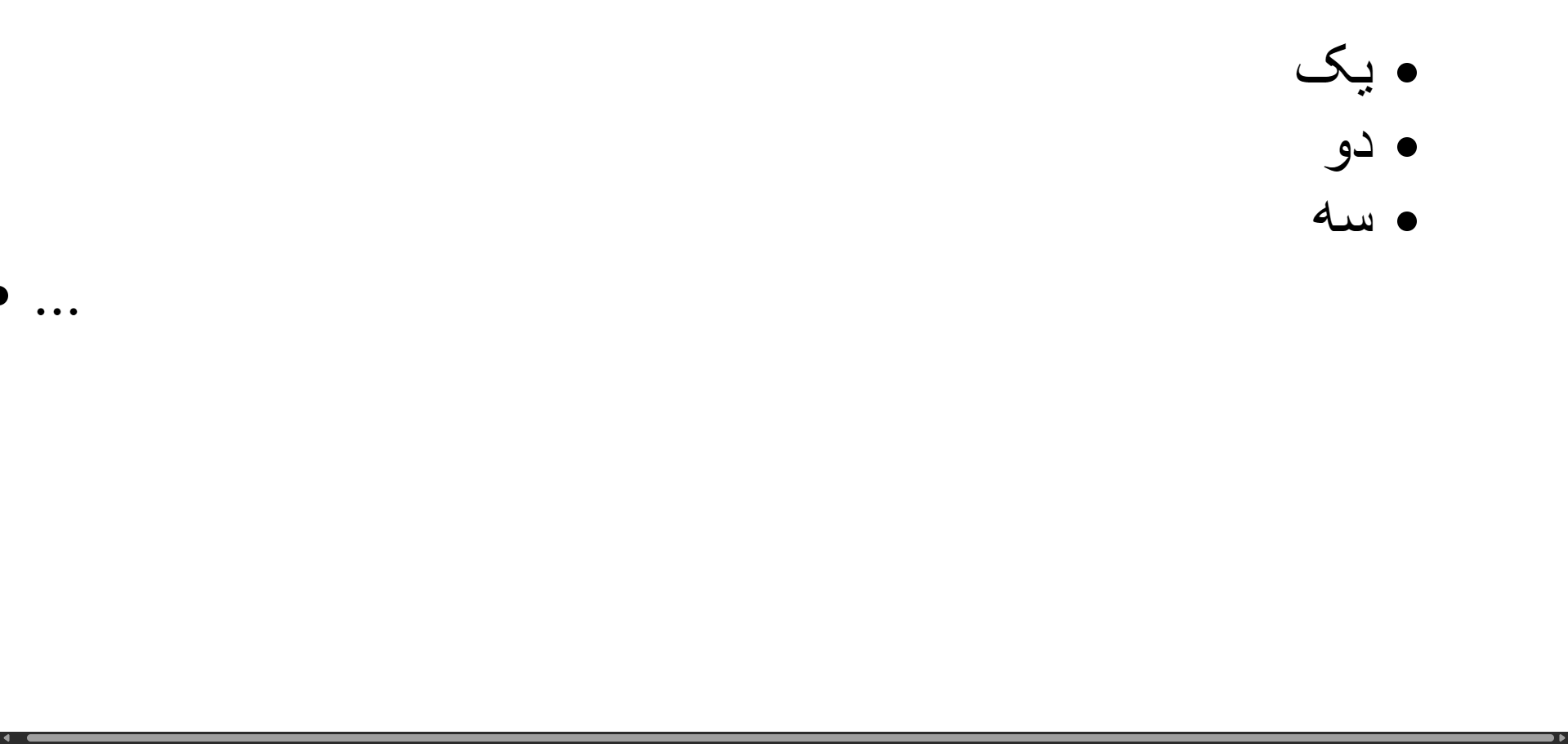
RTL issues:
...is LTR.- Horizontal scrollbar caused by overflow.
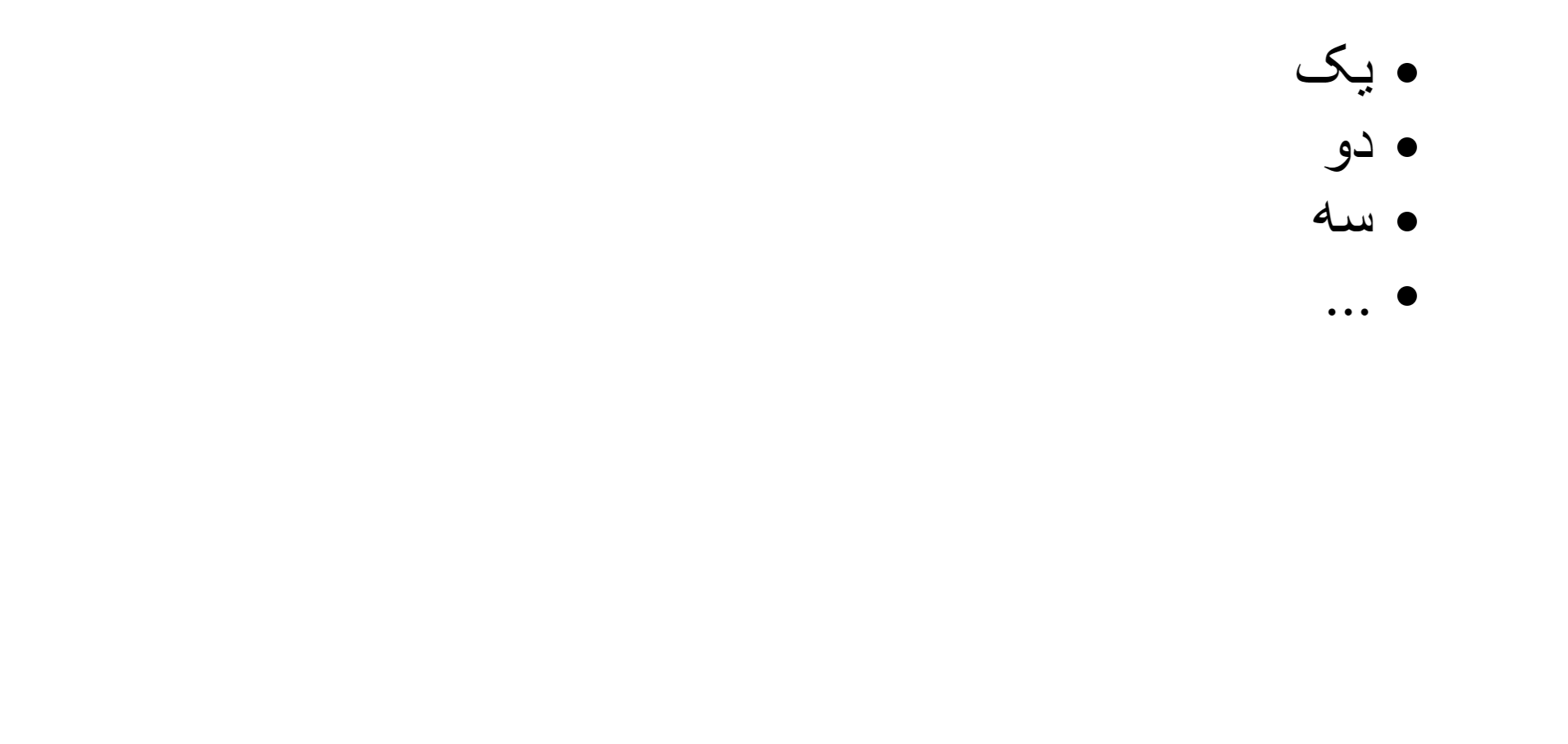
A solution:
html[dir="rtl"] ul:has(li:dir(rtl)) li {
    direction: rtl;
}
Example 2: Inline heading
<html dir="rtl">
    <style>
        .heading {
            display: inline;
        }
    </style>
    <div class="heading-wrapper">
        <h2 dir="auto" class="heading" id="rtl-hello-world">سلام, دنیا!</h2>
        <a href="#rtl-hello-world">#</a>
    </div>
    <div class="heading-wrapper">
        <h2 dir="auto" class="heading" id="hello-world">Hello, World!</h2>
        <a href="#hello-world">#</a>
    </div>
</html>
RTL issues:
- English (LTR) heading is RTL. This happenes because its wrapper is RTL and heading is inline so it stays on the right side.
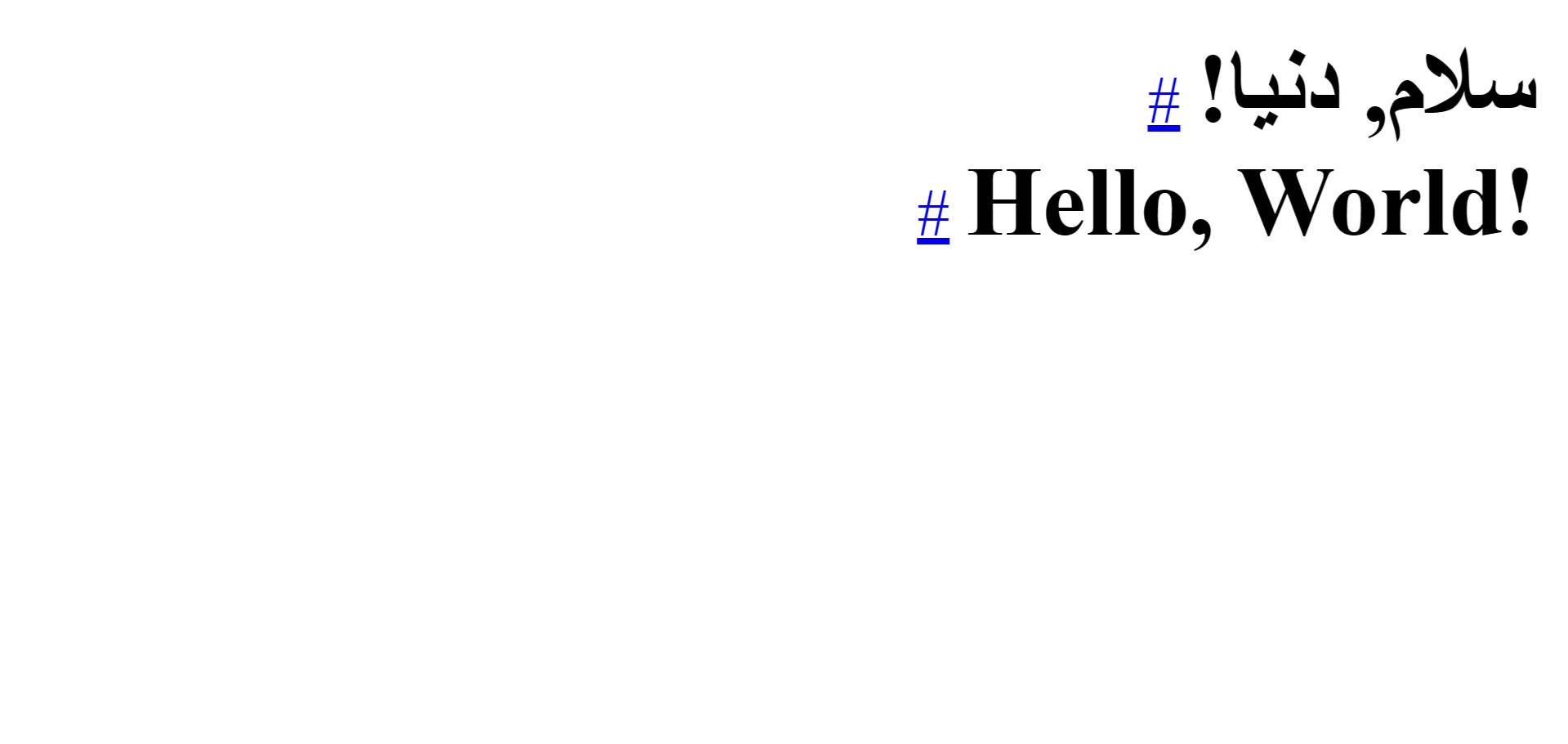
The reason we are not adding dir="auto" to the wrapper (instead of the heading) is simply because we want to simulate a scenario where doing that is not possible. For example I had to deal with this exact scenario when I was using markdown for content and "rehype-github-dir" for adding dir="auto" to tags and I had both RTL and LTR content in the same page.
A solution:
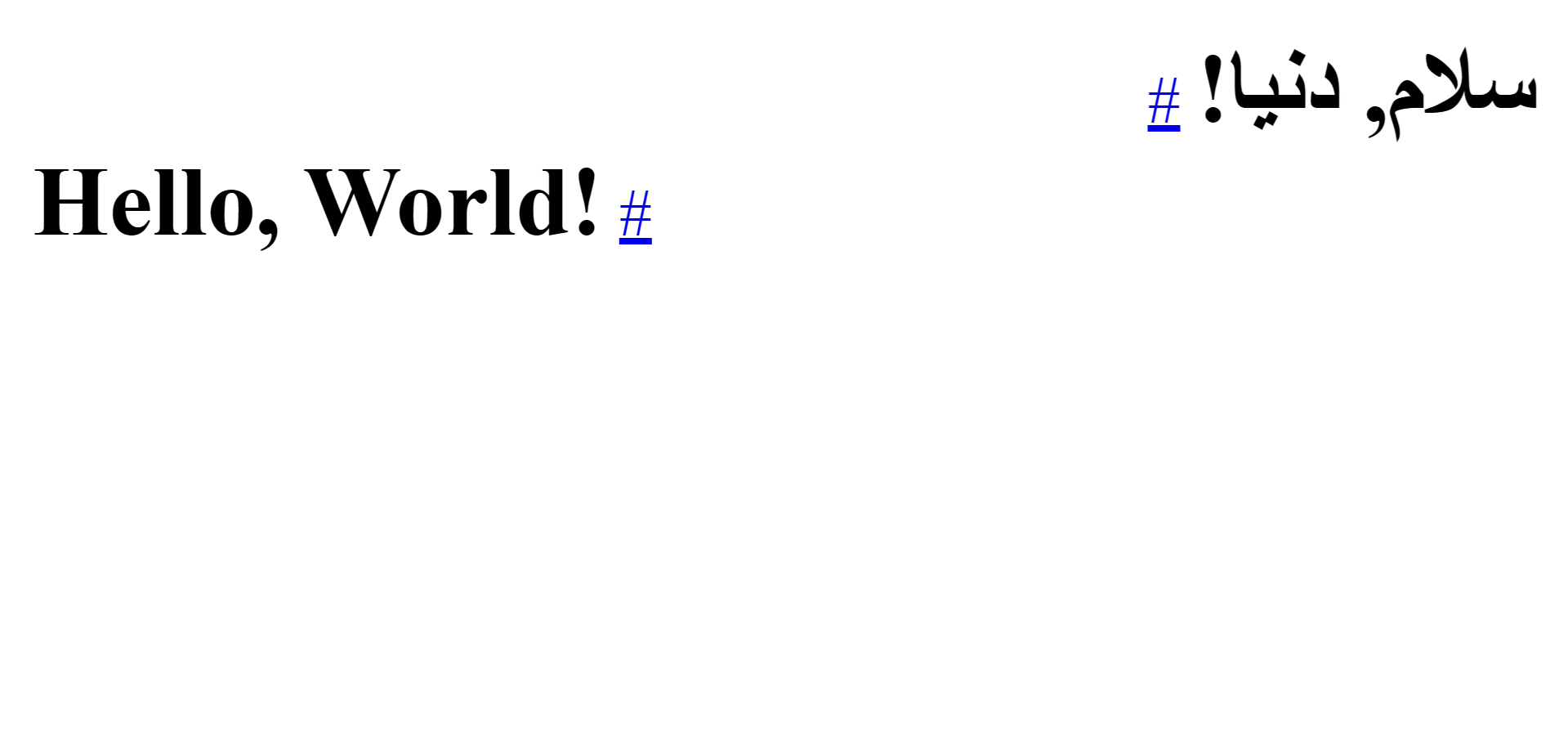
html[dir="rtl"] .heading-wrapper:has(.heading:dir(ltr)) {
    direction: ltr;
}
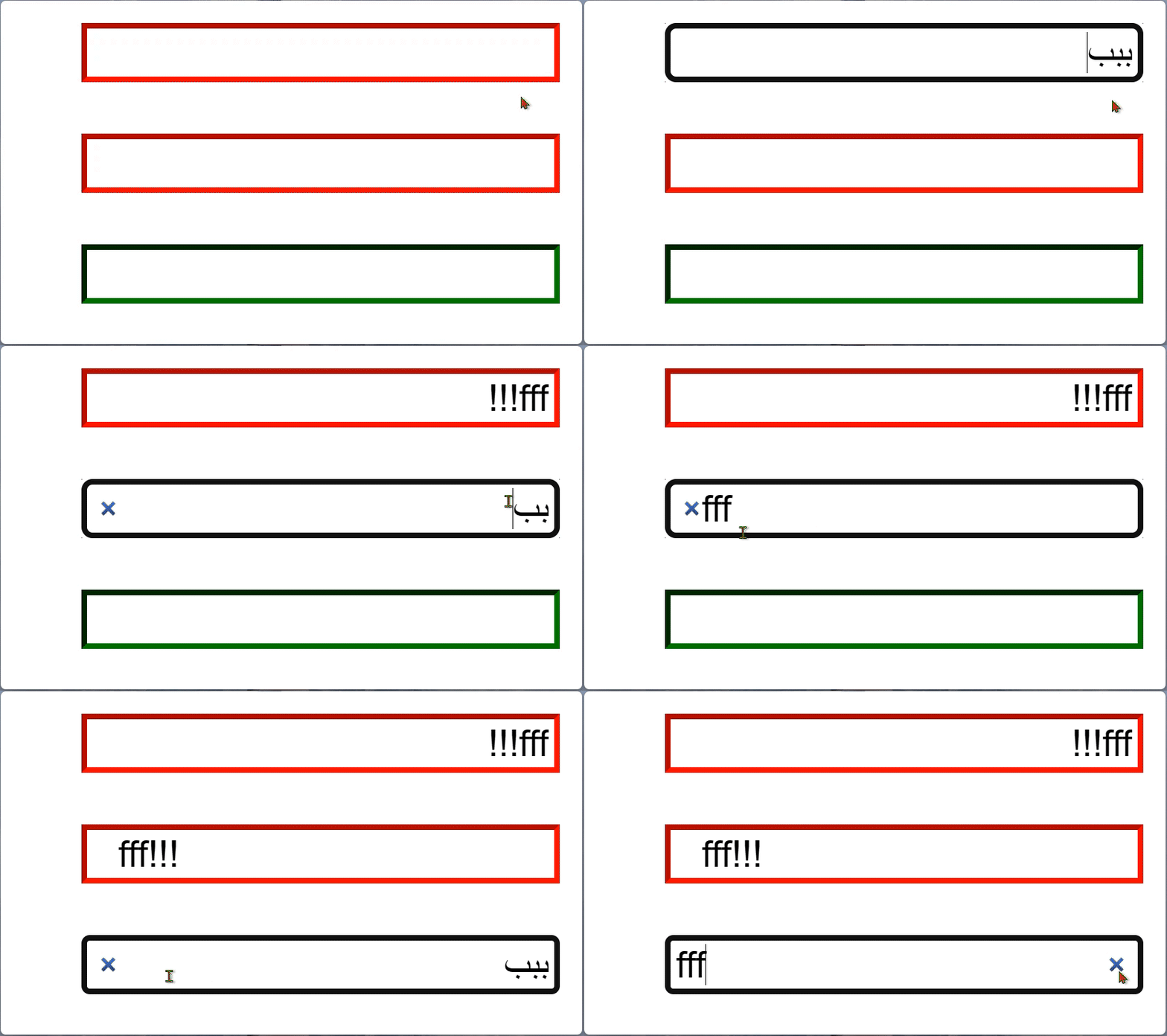
input and textarea initial caret direction
<html dir="rtl">
    <input dir="auto" placeholder />
    <textarea dir="auto" placeholder></textarea>
</html>
[dir="rtl"] [dir="auto"]:placeholder-shown {
    direction: rtl;
}
IMPORTANT
:placeholder-shown would not work if the target element does not have the placeholder attribute.
When using frameworks, make sure the placeholder attribute is rendered on the element even when there is no placeholder text to display.
NOTE
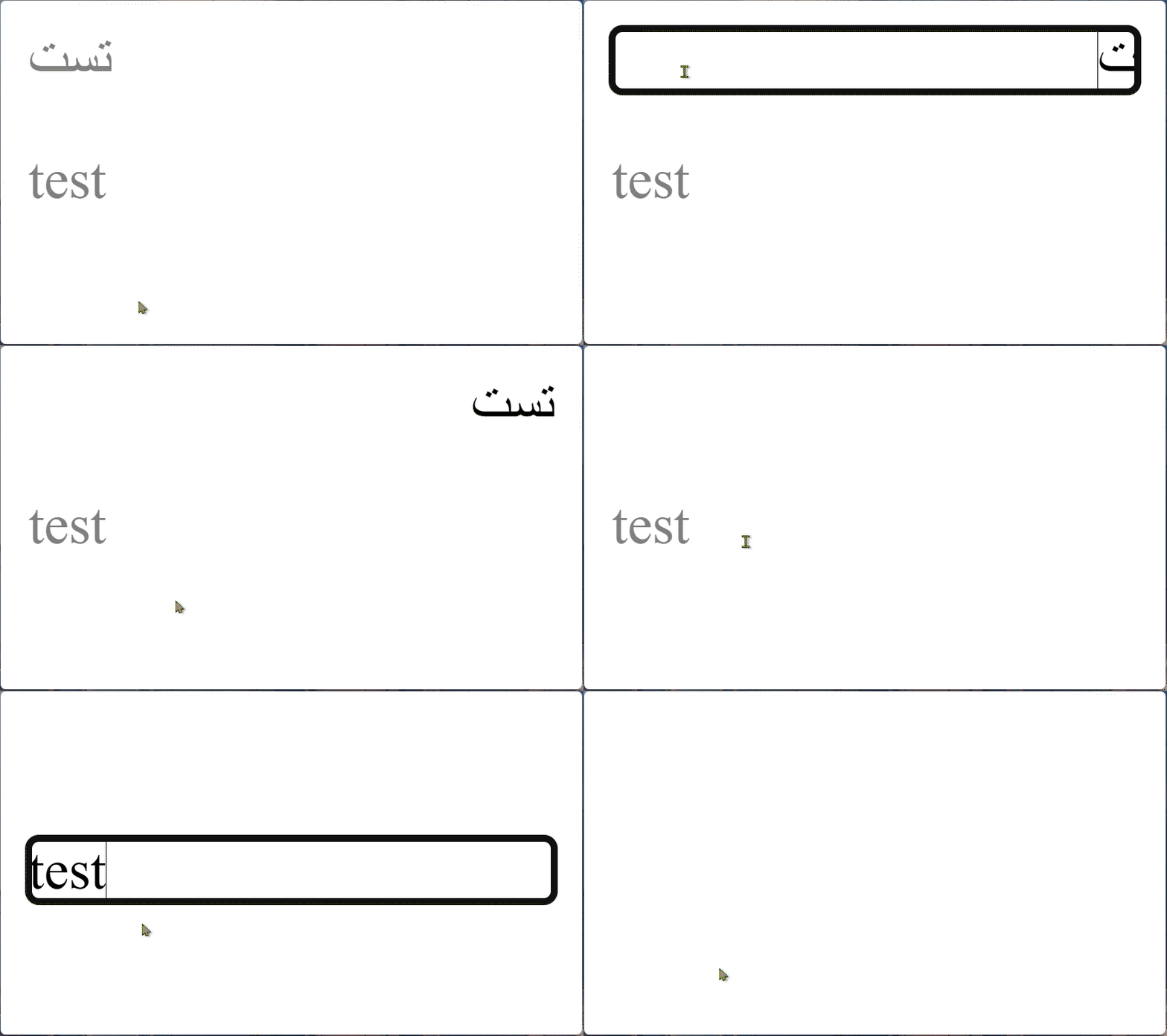
Elements with contenteditable attribute don't need this because they don't show the caret when they're empty.

NOTE
Do not use :empty CSS pseudo-class because it doesn't work as expected2.
Final Words
I hope this guide helps you implement RTL support using pure CSS effectively.
Footnotes
Only when it contains all four sides:
top right bottom left. ↩ ↩2 ↩3Example issues of using
:emptyandcontenteditable:<html dir="rtl"> <input type="text" dir="auto" /> <br /> <br /> <input type="search" dir="auto" /> <br /> <br /> <input placeholder type="search" dir="auto" /> </html> <style> [dir="rtl"] [type="text"][dir="auto"]:empty { direction: rtl; } [dir="rtl"] [dir="auto"]:not([placeholder]):empty { direction: rtl; } [dir="rtl"] [dir="auto"][placeholder]:placeholder-shown { direction: rtl; } </style><p dir="auto" contenteditable data-placeholder="تست"></p> <p dir="auto" contenteditable data-placeholder="test"></p> <style> [contenteditable]:empty::before { content: attr(data-placeholder); color: gray; pointer-events: none; } </style>
↩